SAP Record Transaction using Tcode SHDB
This transaction allows a user to record keystrokes and other keyboard actions so that they may be incorporated into a BDC session. While any session may be recorded, it does not mean that the recording can be used to create a session.Within a recording individual screens may not be allowed.Customized screens may present a problem. Only use the non-customized screens to record sessions.
In this example, the transaction MM is recorded.
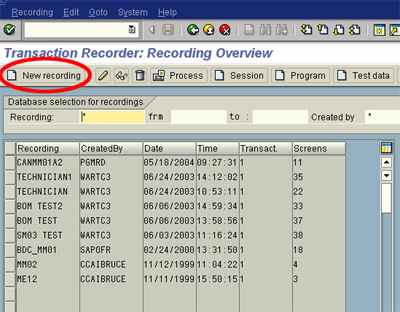
Enter transaction SHDB, also called The Transaction Recorder:Recording Overview.
Click on the “New Recording button”
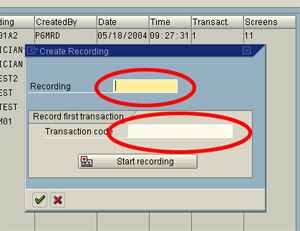
To start a new recording, enter a recording name (up to 10 letters) in the field labeled “Recording,” and the Transaction Code MM01. Click either the “Start Recording” button or the green check mark at the bottom of the screen.
Recording the session:
Once the Start Recording button is pressed, the system displays the screens for the transaction code requested. Enter each field needed for the transaction, and proceed to the following screen. A “recording running” message may appear between screens. During a recorded session screen interaction time is extended.
Completing the transaction
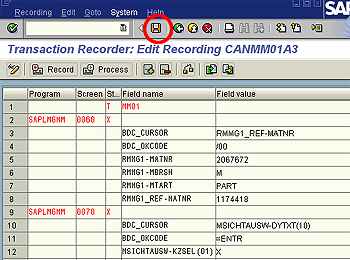
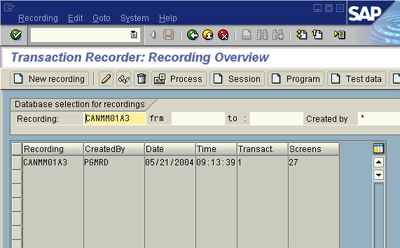
End the transaction normally. When completed, the Transaction Recorder: Edit Recording screen is shown, Click the Save icon, which saves the recording. Green arrow back to the starting point (Transaction Recorder).
Related SAP Tutorials & References
- SAP BDC interview Questions & Answers1. What is full form of BDC Session? Batch Data Communication Session. 2. What are...
- SHDB Transaction code | Report SAPMSBDTSHDB is a transaction code used in SAP R/3 software It is dealing / opening...
- SAP LSMW steps | Legacy System Migration Workbench Step-by-step guide to update Customer Master RecordsNote! The screen shots in this LSMW steps guide are from IDES Release 4.6. They...
- SAP Runtime Analysis Tool ( Transaction SE30 )This run-time analysis tools ( Transaction code SE30) allows the ABAP/4 programmer to trace the...
- SAP Transporting Objects , Standard Text and ABAP reportsSAP currently provide two standard programs for you to transport the standard texts. RSTXSCRP -...
- Customer Master Record ( SAP MM )This documentation covers the details of Customer Master Record ( SAP MM )To go to...
- LOCAL (ABAP Keyword)LOCAL is a keyword used in SAP ABAP programming. This tutorial covers its introduction &...
- Configuration of Asset Accounting in SAP FIThis documentation covers the details of Configuration of Asset Accounting in SAP FIThese are the...
- Open SAP Service Connection ( SAP material)This document has been written to capture all the information and steps necessary to open...
- Connection with External Time Recording Systems | SAP HR PDF materialThis function allows you to upload personnel time events recorded at a time recording system...
